
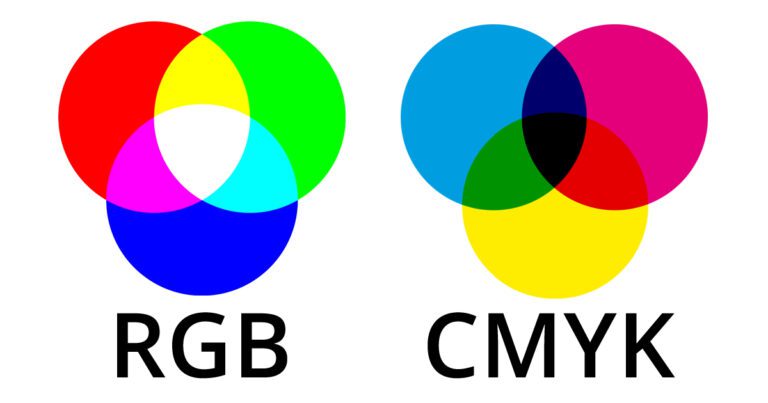
What are RGB colors and CMYK colors in digital and print? Understanding these color models is essential for businesses, designers, and marketers who want their visuals to look professional and consistent. RGB and CMYK are two primary color models used for different purposes. RGB is mostly used for screens, digital media, and online content, while CMYK is designed for printing and physical products. Knowing how these colors work helps brands maintain accurate colors across all platforms.
Many companies rely on professional guides like What is RGB color and CMYK colors to ensure their visuals are correct. Using the wrong color model can result in colors appearing dull, incorrect, or unprofessional. Brands that understand color models can create consistent, high-quality designs for both digital and print marketing campaigns.
Understanding RGB Color
RGB stands for Red, Green, and Blue. This color model is used for devices that emit light, such as computer monitors, smartphones, and televisions. RGB is an additive color model, which means it creates colors by combining red, green, and blue light. When all three colors are combined at their highest intensity, they produce pure white.
Key Features of RGB
- An additive color system that uses light
- Best for digital media, websites, and social platforms
- Provides vibrant and bright colors on screens
- Can create millions of color variations
Designers use RGB to create visually striking digital content. It is ideal for social media graphics, websites, digital advertisements, and video content. RGB allows precise control over color intensity and brightness, making it perfect for screens where light is emitted.
Understanding CMYK Colors
CMYK stands for Cyan, Magenta, Yellow, and Key (Black). This color model is used for printing on paper or other physical materials. CMYK is a subtractive color model, meaning colors are created by subtracting light. Combining all CMYK colors at full intensity produces a deep black.
Key Features of CMYK
- Subtractive color system for printing
- Ideal for brochures, posters, packaging, and labels
- Produces accurate colors on physical materials
- Uses four inks to mix a wide range of colors
CMYK is essential for printing because screens use light to display colors, while printers use ink. Without converting RGB designs to CMYK, printed colors may look faded or different from what is seen on a monitor. This is why businesses need to understand which color model to use depending on the medium.
Differences Between RGB and CMYK
Understanding the differences between these color models is important for creating professional designs.
- RGB is used for digital displays; CMYK is used for print
- RGB is an additive system; CMYK is subtractive
- RGB offers brighter, more vibrant colors; CMYK is more muted
- Converting RGB to CMYK may slightly change the appearance of colors
By knowing these differences, businesses can avoid costly mistakes when creating packaging, Your Box Packaging marketing materials, or digital content. Proper color management ensures that brand colors remain consistent across all platforms.
Benefits of Understanding Color Models
Knowing the right color model for a project has several advantages:
- Maintains consistent branding across digital and print
- Reduces wasted materials due to incorrect colors
- Ensures professional and high-quality appearance
- Improves customer perception and trust in the brand
- Enhances marketing and product packaging effectiveness
Using the correct color model is particularly important for packaging businesses. Accurate colors help make packaging visually appealing, which can influence customer purchasing decisions.
Practical Tips for Designers
Designers and businesses should follow a few key tips to manage colors effectively:
Use Software Tools
Professional software like Adobe Photoshop, Illustrator, or InDesign allows switching between RGB and CMYK. This helps designers preview colors before final output.
Test Print Materials
Always test print samples to ensure colors match expectations. This avoids surprises when producing large quantities.
Know Your Medium
Decide whether the design is for screen display or print before starting. This choice determines which color model to use.
Adjust Colors Carefully
When converting from RGB to CMYK, adjust colors to maintain vibrancy. Certain RGB colors may not be achievable in CMYK and need fine-tuning.
Why Businesses Need Proper Color Management
Accurate colors help brands establish professionalism and credibility. Whether for packaging, advertising, or social media, colors play a vital role in how customers perceive a business. Companies that invest in understanding RGB and CMYK colors save time, reduce costs, and improve brand consistency.
Working with experienced companies like Your Box Packaging ensures designs use the correct color models. Professional packaging and printing services can guide businesses to produce visually consistent materials that appeal to customers.
Conclusion
What is RGB colors and CMYK colors? Both are essential color models for businesses, designers, and marketers. RGB is best for screens and digital content, while CMYK is designed for printing and physical products. Understanding their differences ensures accurate colors, consistent branding, and high-quality visual materials.
Using the right color model for the right medium enhances marketing efforts, strengthens brand identity, and improves customer trust. Professional services like Your Box Packaging help brands implement proper color management for digital and print designs, ensuring every product and campaign looks polished and appealing.